Sonos App Navigation Overhaul Is Here: What Is Changing, Why It Matters, and How to Try It Now
If you own a Sonos speaker and have felt that nagging frustration every time you open the app, the kind where something that should be simple somehow takes three taps and a swipe in the wrong direction, you are not imagining things. Sonos has been watching too. Literally. After spending "hundreds of hours watching real customers use the Sonos app," CEO Tom Conrad has announced a significant navigation overhaul rolling out now in beta.
And unlike 2024, you get to choose when you experience it.
Why the Sonos App Has Been a Problem Worth Fixing
To understand what is changing, you need to understand how things broke. In May 2024, Sonos launched a fully redesigned app to coincide with the debut of the Sonos Ace headphones, its first wireless over-ear product. The app was buggy. Features that longtime users depended on had disappeared. The lock screen controls, playlist management basics, and navigation logic that Sonos veterans knew from the old app were gone or buried. The backlash was swift and severe.
Hardware sales fell. Staff were laid off. Then-CEO Patrick Spence departed. The 2024 app relaunch became one of the most discussed product failures in consumer audio in years. Sonos has spent the period since in a kind of quiet rebuilding mode, restoring features one update at a time, and trying to earn back the trust of a customer base that had genuinely loved the brand.
Read More: India's Current Account Surplus Hit $7.1 Billion in Q4 FY26: What the Numbers Are Really Saying
What the New Sonos App Navigation Update Actually Changes
The current update, now available as an opt-in beta, is described by Conrad as "not a new app, but a new way of navigating Sonos inside the app you already have." That framing is deliberate. Sonos is not ripping everything out again. It is fixing the navigation architecture that made the existing app difficult to use.
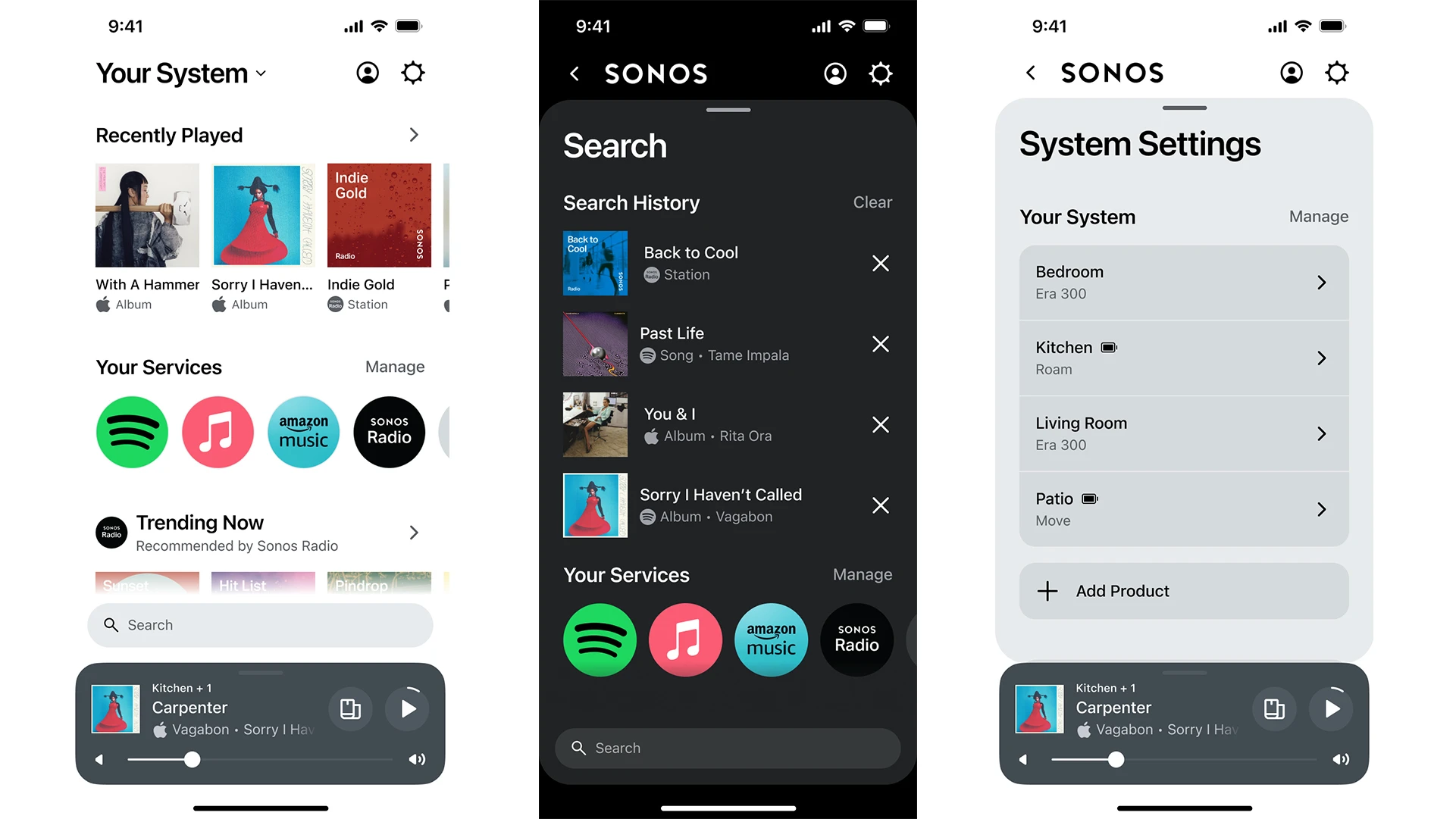
The most visible change is the introduction of three clear tabs: Home, System, and Search. These replace the confusing mixture of hidden swipe gestures, stacked content cards, and close buttons where back buttons should have been. The previous interface used custom elements that felt out of place on both iOS and Android. The new structure is intended to match how people naturally expect apps on those platforms to behave.
The volume control interface has been rebuilt. Conrad described it as "a core mechanism that is easier to grab and fine-tune," with dedicated buttons added alongside the slider and a new method for syncing volume across grouped rooms. Anyone who has tried to quietly adjust sound across multiple speakers at night without waking the house will appreciate this one.
There is also improved control over how players are listed and displayed, a refreshed Now Playing screen, the ability to swipe to delete a track from a playlist, and dozens of smaller friction fixes identified through the user research.
Read More: NLC India OFS, Vodafone Idea Rally, Airtel Relief: Three Market Stories That Defined June 9, 2026
How to Try the Beta and What to Expect
The changes are not yet live in the main production app. They are available inside the Sonos beta program, which is accessible through a sign-up on the Sonos website. Once you install the beta, the new navigation is not even on by default. You enable it manually by going to Settings and toggling "Enable Improved Navigation." Sonos has made it opt-in deliberately, collecting feedback before it goes live for everyone.
On Android, the restoration of lock screen and notification shade playback controls has already arrived through an earlier update, and users were vocally relieved, with some on Reddit calling it a "game changer" while noting it should have returned much sooner. The equivalent feature for iOS using Live Activities, which would enable Lock Screen and Dynamic Island controls on iPhone, is reported to be in progress.
Read More: “Our Customers Are in America”: Why Opendoor Shut Its India Operations and Fired 250 Employees
What the SonosNet Setting Update Added
The May 2026 update added an in-app setting to enable or disable SonosNet per household, something previously only accessible through technical workarounds. SonosNet is Sonos's proprietary wireless mesh network that helps speakers communicate. Giving users direct control over this within the app is a small but meaningful step toward transparency.
Closing Thought
Sonos built its reputation on the idea that premium audio should be simple. The 2024 app broke that promise visibly enough that the company had to reckon with real consequences. What Conrad and the current team are doing now is methodical, user-researched, and opt-in by design. That is the right approach after a trust-damaging year. Whether the Sonos app changes in 2026 complete the recovery depends on whether the execution matches the intention. The beta is live. The evidence will come from real homes, not company headquarters.
Disclaimer: This article is based on information available across the web. Parchar Manch does not take responsibility for its complete accuracy, as the content could not be fully verified.
FAQs
What is the main change in the new Sonos app update?
The major change is a new three-tab navigation structure replacing hidden gestures and content cards. Tabs for Home, System, and Search simplify how users move through the app. Volume controls have also been redesigned for easier use.
Is the new Sonos app update mandatory?
No. The updated navigation is currently in beta and is an opt-in toggle within the beta app, under Settings. Sonos plans to keep it optional until the update is fully refined.
How do I try the new Sonos app navigation?
Sign up for the Sonos beta program, install the beta app, and then go to Settings and enable "Enable Improved Navigation." Note that using beta software may carry some risk of bugs.
What happened with the 2024 Sonos app that caused all the controversy?
The 2024 app redesign launched with multiple bugs, removed features users depended on, and had confusing navigation. It led to falling hardware sales, staff layoffs, and the departure of former CEO Patrick Spence.
Does the new Sonos update include lock screen controls for iPhone?
Lock screen controls via Live Activities for iPhone are reported to be in development. Android lock screen and notification shade controls were restored in an earlier 2026 update and have been well received.
What is SonosNet and why does the new setting matter?
SonosNet is Sonos's proprietary wireless mesh protocol used to connect speakers in a home. The new in-app setting lets users enable or disable it per household directly within the app, without needing technical workarounds.